Expert analysis, not a violation dump
Prioritize EMC risks, show supporting evidence, map standards and explain why the issue matters.
Severity + risk + evidence
Recommended engineering action
Expected improvement / gain
Next-generation oscilloscope intelligence
OsciNex Live adds real-time FFT, spectrograms, CISPR masks, detector logic, and ML/AI-powered source correlation on top of supported oscilloscopes — linking EMI violations to likely sources and root causes, built for pre-cert speed.
See the flow from scope streaming to live FFT, CISPR limits and pre-cert insights.
Guided workflow
OsciNex Live walks users from setup to evidence-ready reports without jumping between disconnected tools.
Choose CISPR standard, band, detectors, calibration, units and acquisition.
Detect peaks and emissions while waveform data streams from the scope.
Compare peak, quasi-peak and average margins against limits.
Generate evidence, root-cause hints and export-ready findings.
Platform access
Open the protected platform when your account is ready.
Oscinex engineering workflow
Oscinex connects live oscilloscope measurements, recording and replay, measurement comparison, EMI pre-compliance analysis and engineer-controlled PCB remediation into one continuous workflow.
Connect a supported oscilloscope and stream waveform data into real-time FFT, spectrograms, CISPR masks and detector workflows.
Capture measurement sessions for later review, replay recorded waveform and analysis data, and revisit important emissions without repeating the original live test.
Compare live or recorded measurements and A/B test results to track changes in emission levels, margins and spectral behaviour across tests.
Validate peak, quasi-peak and average margins, then use signal analysis and ML/AI-powered correlation to identify likely sources and root causes.
Inspect board geometry, return-current paths, copper, PDN behaviour and electromagnetic fields. Preview proposed engineering changes before applying them.
Re-measure after approved changes, compare before-and-after results, verify improvement and produce evidence and export-ready engineering findings for pre-certification work.
Built into Oscinex Live · Diagnostic Oscilloscope
Oscinex Diagnostic Oscilloscope turns a live signal anomaly into a guided engineering investigation. Synchronized CH1–CH4 waveforms, Fault Hunter, Time Machine, heat maps, E×H energy flow, ML intelligence and the Evidence Graph work together to move from “something changed” to a defensible root-cause candidate.
Follow synchronized traces, guided demo, measurement trust, E×H energy flow, Fault Hunter and evidence-backed diagnosis in one scope workspace.
PCB EMC engineering autopilot
Oscinex PCB EMC Autopilot brings PCB editing, EMI analysis, field solving, return-current inspection and engineer-controlled mitigation into one workspace.
See PCB inspection, EMI analysis, field solving and engineer-controlled mitigation in one workflow.
Guided workflow
Oscinex PCB EMC Autopilot takes the board from import and analysis through controlled EMI mitigation and validation.
PCB EMC AUTOPILOT
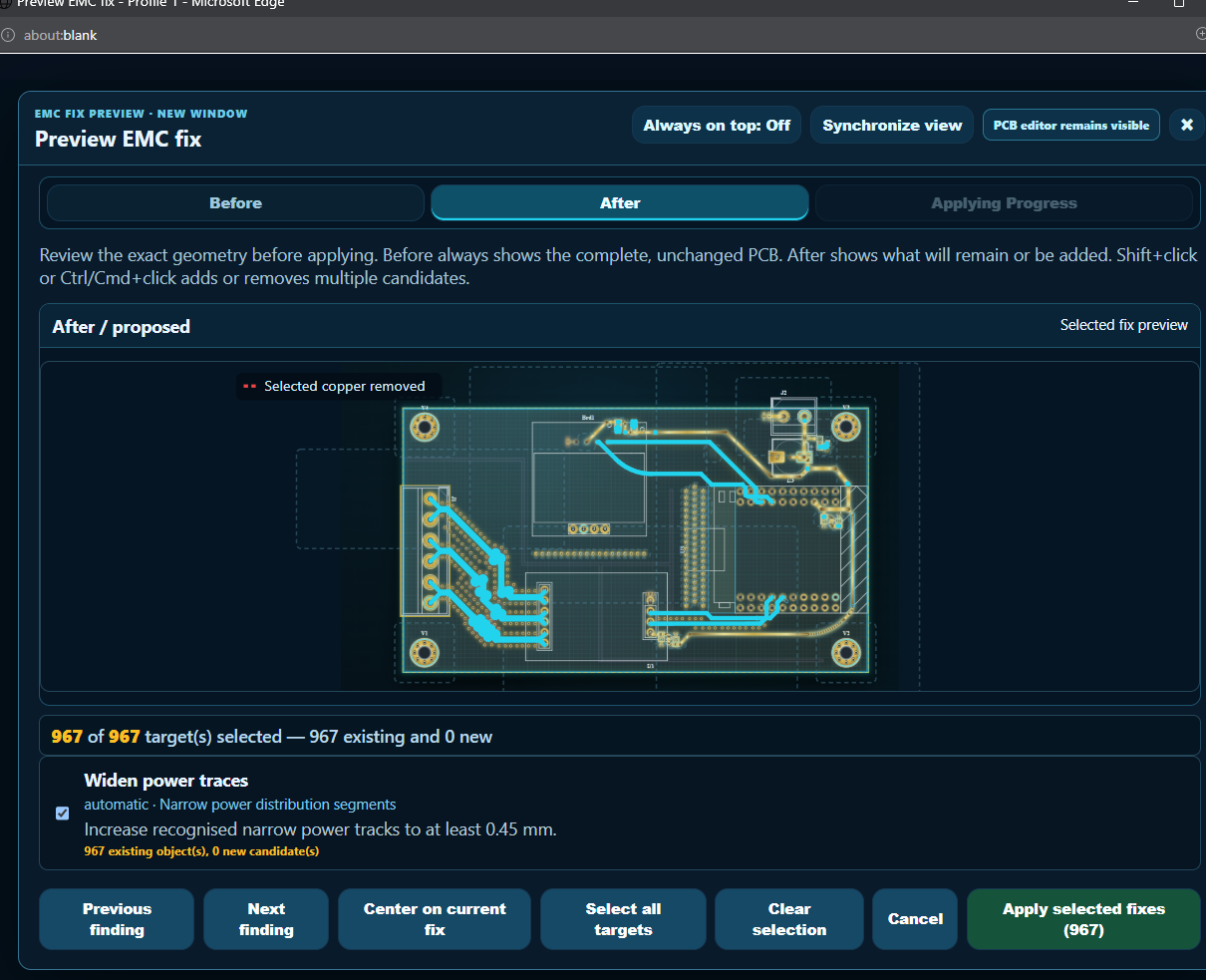
Oscinex’s PCB analyser turns findings into engineering actions: evidence, recommended remediation, expected gain, exact geometry preview, selective application, undo and reanalysis.
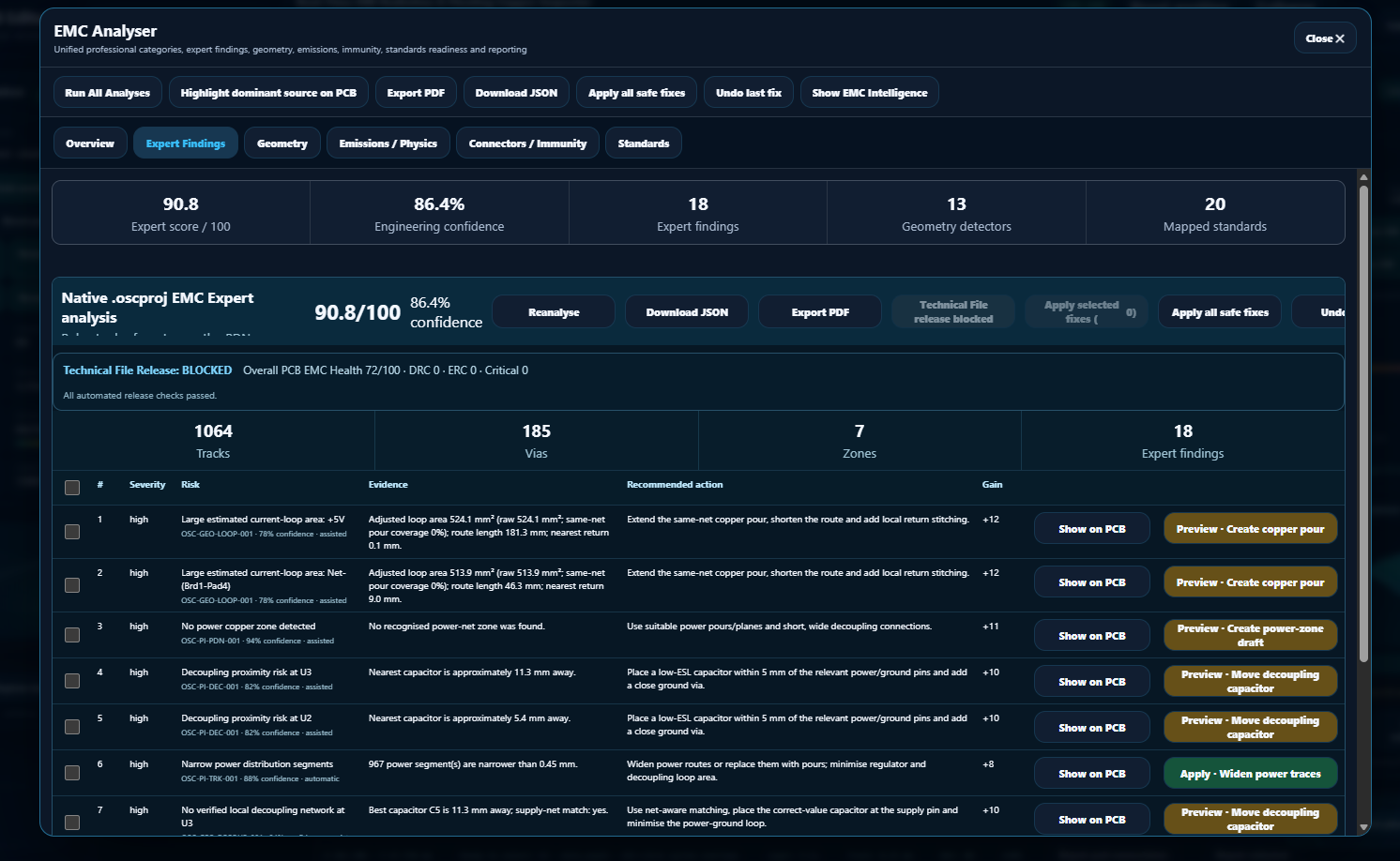
WHAT AUTOPILOT MEANS HERE
“Autopilot” is not a black box. Every proposed change is surfaced with the reason, affected geometry and a controlled path to approval.
Prioritize EMC risks, show supporting evidence, map standards and explain why the issue matters.
Move from “what is wrong?” to “show me exactly what you propose to change.”
Import or open the PCB design and establish board geometry, nets, stackup and constraints.
Analyse EMI, return-current paths, copper health, PDN behaviour and electromagnetic fields.
Preview engineer-controlled mitigation such as routing, copper, return-path and layout improvements.
Validate the resulting design, DRC state and EMC evidence before export.
Platform access
Open the protected PCB EMC engineering workspace when your account is ready.
Access follows your Oscinex subscription. Start with a curated trial, unlock broader engineering scenarios with Standard and Premium, or use the complete library with Pro.
FREE
12 curated scenarios for evaluation and guided demonstrations.
Core conducted, radiated and measurement scenarios for everyday EMI investigation.
Advanced compliance, immunity, mitigation and higher-severity pre-certification scenarios.
Complete Virtual EMC Lab scenario catalogue with full professional access.